
Solo GPU vs Shared GPU Explained: Cost and Control Differences
Quick Answer: A solo GPU is a dedicated GPU environment that gives one tenant exclusive access to GPU hardware, memory, and network bandwidth for AI training and inference workloads. A shared GPU is a multitenant environment that partitions a single GPU or cluster across multiple teams, applications, and scheduling quotas at the same time.
The two models differ in what teams can rely on. In shared environments, a neighbor's training job can consume memory bandwidth and cause latency spikes, quota limits queue work behind other tenants, and multitenant boundaries complicate data governance. These risks matter most for production workloads that need predictable latency, stable throughput, and auditable isolation.
This article compares the two models across performance, cost, security, and fit, explains why dedicated compute carries a premium, and outlines what to evaluate before moving workloads from shared GPU cloud to dedicated infrastructure.
How Solo GPU and Shared GPU Compute Work
Solo GPU: exclusive hardware for one tenant
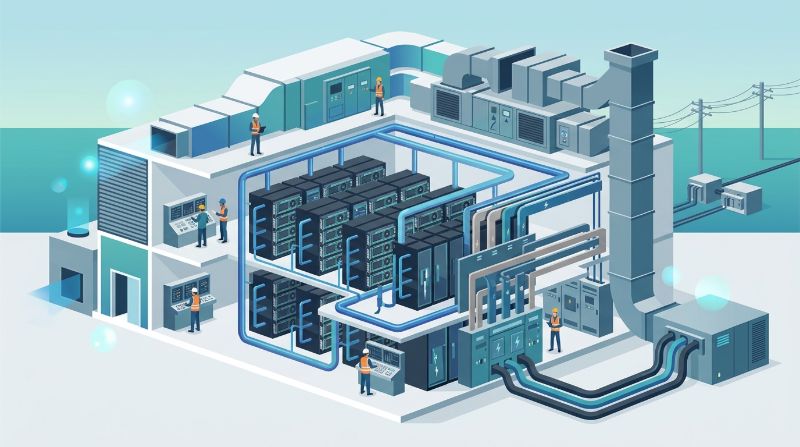
Solo GPU compute, often called dedicated GPU compute, is a single-tenant deployment model. The provider assigns one customer exclusive access to specific GPU hardware, local memory, and the network bandwidth attached to it, so no other workload competes for the same silicon. The resources stay dedicated for the contract term, whether utilization runs at 10 percent or 90 percent.
Shared GPU: partitioned capacity across tenants
Shared GPU compute is the multitenant model used by most GPU cloud providers and many internal clusters. One GPU, one node, or one cluster is partitioned across teams through hypervisor or scheduler controls. Each tenant receives a slice of compute and memory while bandwidth and I/O are shared. This pooling lets providers serve more customers per physical asset, which is why shared instances carry a lower price per hour.
Why Shared GPU Environments Create Production Risk
Shared GPU environments are designed for utilization rather than isolation. Teams often discover the trade-off during production rollout, when training jobs that ran reliably in prototyping begin to stall or inference latency drifts during peak hours. Three structural issues explain most failures: neighbor interference, quota contention, and multitenant boundaries.
The noisy neighbor problem in GPU cloud
A noisy neighbor is another tenant whose workload saturates shared resources on the same physical GPU or node. Memory bandwidth, PCIe throughput, and cache are finite, so a neighbor's data-heavy training job can slow an unrelated inference workload substantially even when the GPU core allocation looks unchanged on paper. The result is performance that varies by time of day and by whoever else is running. Teams evaluating shared infrastructure should measure latency distribution across peak hours rather than average throughput, because averages hide the spikes that break inference SLAs.
Quota limits and scheduling contention
Multitenant platforms cap how much GPU capacity each tenant can request, and the same scheduler that balances all tenants enforces those quotas. A team that needs 32 GPUs for a fine-tuning run can end up queued behind other teams' reservations, turning a two-hour job into a two-day wait. For production timelines, quota uncertainty is a scheduling risk as much as a performance risk: releases slip, validation windows compress, and engineers spend hours managing cluster state instead of building. Evaluation should cover quota guarantees, reservation lead times, and whether priority classes exist for production jobs.
Multitenant security boundaries and data governance
Every tenant boundary in a shared environment is a control that must be configured, audited, and maintained. Storage volumes, container images, and network segments coexist on shared infrastructure, so isolation depends on the provider's virtualization and access controls rather than on physical separation. For teams handling sensitive data, regulated workloads, or proprietary model weights, this reliance on logical controls complicates compliance documentation and raises the cost of proving data boundaries. The solution is not to abandon GPU cloud but to match isolation level to workload: keep experimentation on shared capacity and reserve dedicated environments for production, sensitive, or latency-critical work.
What Solo GPU Compute Delivers for Production AI
Consistent performance for training and inference
With exclusive hardware, throughput becomes deterministic: the same job produces the same timing profile on day one and day thirty, because no external tenant can consume the memory bandwidth or the I/O path. This consistency matters for training runs that span days, where a mid-run slowdown wastes GPU hours, and for inference serving, where latency outliers translate directly into user-facing degradation. Teams can size capacity against their own workload profile instead of against a shared environment's worst-case behavior.
Clear data boundaries for sensitive workloads
A solo GPU environment keeps compute, storage, and networking inside a single tenant boundary. Data at rest and in transit stays within the customer's own segment, which simplifies compliance evidence for sectors such as financial services and healthcare, where data residency and access documentation matter. For teams that must demonstrate who can touch model weights or training data, dedicated infrastructure provides an answerable environment: one tenant, one boundary, one audit story. Private AI infrastructure built on dedicated GPU environments is designed for exactly these control, security, and residency requirements.
Predictable cost for enterprise budgets
Dedicated capacity is priced as a fixed monthly commitment rather than per-hour utilization, so finance teams can forecast GPU spend to the dollar. The trade-off is paying for capacity regardless of utilization; the benefit is that a stable cost line replaces surprise overage bills and spot-price spikes. Enterprises running sustained workloads, such as continuous fine-tuning or always-on inference, generally find stable pricing more economical than variable pricing once utilization passes a modest threshold. The exact crossover depends on utilization, workload mix, and operational costs, which is why cost modeling belongs in the evaluation process.
Solo GPU vs Shared GPU: Side-by-Side Comparison
The table below compares the two models across the five dimensions that matter most in procurement: tenant model, performance, cost, security, and fit.
| Dimension | Solo GPU (Dedicated) | Shared GPU (Multitenant) |
|---|---|---|
| Tenant model | Single-tenant: exclusive GPU hardware, memory, and network bandwidth | Multitenant: one GPU or cluster partitioned across teams and workloads |
| Performance | Consistent and deterministic; no external workload affects throughput | Variable; neighbor workloads can cause latency spikes and throughput drops |
| Cost | Higher fixed monthly price; predictable to budget | Lower per-hour rate; variable with utilization, quota events, and overages |
| Security | Clear physical and logical boundary; dedicated data paths support compliance | Logical isolation only; boundary quality depends on provider controls |
| Best fit | Production training, inference serving, regulated or sensitive data | Experiments, prototyping, bursty jobs, elastic or exploratory usage |
The choice is workload-dependent. Shared capacity remains a rational starting point for experiments and elastic usage, while dedicated compute earns its premium when performance consistency, data boundaries, or budget certainty become hard requirements. Most mature teams end up running both models: shared for exploration, dedicated for production.
When to Choose a Shared GPU vs a Solo GPU
Experiments vs production workloads
Prototyping, hyperparameter sweeps, and one-off analyses tolerate variability, restarts, and queueing, so shared GPU capacity is often the right economic fit. Production is different: serving, continuous fine-tuning, and scheduled training carry deadlines and SLAs that shared environments cannot guarantee. A practical classification rule is to assess the consequence of failure; if a delayed or degraded run costs money or reputation, the workload belongs on dedicated infrastructure. Research groups commonly start with shared lab capacity and add dedicated nodes as deadline-driven experiments mature.
Sensitive data vs routine workloads
Workloads that touch personal data, regulated records, proprietary model weights, or data under contractual restriction need a defensible boundary. Shared environments can be configured for isolation, but the evidence trail is longer and the cost of misconfiguration is permanent. Dedicated environments reduce that risk by construction. In finance, the decision is often driven by residency and audit requirements, which is why AI infrastructure for financial services emphasizes dedicated and U.S.-based deployment patterns.
Stable budgets vs elastic usage
If AI spend is fixed in an annual plan, dedicated pricing converts a variable line item into a known number. If usage is genuinely elastic, such as seasonal workloads or a research group with bursty demand, per-hour shared pricing avoids paying for idle capacity. The decision hinges on utilization: sustained utilization above the cost crossover favors dedicated, while low and unpredictable utilization favors shared. Finance and platform teams should model both scenarios with real workload histories before choosing.
Why Solo GPU Compute Costs More Than Shared GPU
Shared GPU pricing is low because the provider oversubscribes capacity: idle cycles from one tenant are sold to another, and the same physical GPU serves multiple revenue streams. Dedicated pricing reflects exclusivity. The provider cannot resell idle capacity, so the customer pays the full cost of hardware, facility, and power regardless of utilization, plus a margin for availability and support.
The comparison should therefore account for what the price includes. A shared instance rate covers compute slices and little else, while dedicated offerings often bundle networking, storage, monitoring, and operations. The meaningful figure is not the per-GPU-hour rate but the total monthly cost of running a given workload reliably. When teams compare a shared cluster plus engineering overhead, queueing delays, and retry costs against a dedicated environment, the gap narrows significantly at sustained utilization. Managed AI infrastructure packages operations with dedicated hardware, which often makes the effective cost lower than a self-managed shared setup once operational burden is priced in.
Migrating from Shared GPU to Solo GPU: What to Consider
Migrating workloads from shared to dedicated GPU environments is less about rewriting code and more about repointing infrastructure. Most AI frameworks treat GPU nodes as interchangeable, so the migration surface is configuration: environment variables, storage mounts, scheduler settings, and data movement. Teams should inventory workloads first and classify them by dependency on shared-platform features such as auto-scaling, spot pricing, or platform-managed notebooks.
Before migration, measure a performance baseline in the shared environment, including latency distribution and throughput at peak hours, so post-migration gains can be demonstrated rather than asserted. Plan the cutover in stages: migrate one low-risk inference service or training job, validate end to end, then expand. Orchestration matters during this period because teams often run both environments in parallel; OnePlus Platform, OneSource Cloud's AI orchestration platform, provides unified scheduling, GPU quota management, and usage observability across workloads, which simplifies running a mixed environment during transition.
Finally, model the budget change explicitly. The migration trades variable per-hour costs for a fixed monthly commitment, so finance should re-forecast before cutover, and platform teams should confirm capacity lead times so the dedicated environment exists before the shared one is released. A phased migration with clear success criteria keeps risk low while delivering the consistency and boundary improvements that motivated the move.
FAQ
What is the difference between a solo GPU and a shared GPU?
A solo GPU is a dedicated GPU environment that gives one tenant exclusive access to hardware, memory, and network bandwidth, so performance is consistent and isolation is clear. A shared GPU partitions one GPU or cluster across multiple tenants, lowering per-hour cost but introducing neighbor interference, quota contention, and logical-only security boundaries. In practice, choose by what you need to rely on: stable timing and a single audit boundary versus low entry cost.
What is the noisy neighbor problem in GPU cloud?
In multitenant GPU cloud, a noisy neighbor is another tenant running workloads on the same physical GPU or node. Because memory bandwidth, cache, and I/O are shared, a neighbor's heavy training job can degrade your inference latency or throughput even when core allocation appears unchanged. The effect is performance that varies with other tenants' activity, which breaks latency budgets and makes production capacity planning unreliable.
Why is dedicated GPU compute more expensive than shared GPU?
Dedicated pricing reflects exclusivity: the provider cannot sell your idle capacity to another tenant, so you pay for hardware, facility, and power regardless of utilization. Shared pricing is lower per hour because capacity is oversubscribed across many tenants. The comparison shifts when engineering overhead, queueing delays, retry costs, and overage fees are included, so teams should compare the total monthly cost of reliable operation rather than the per-hour rate.
When should I use a dedicated GPU instead of a shared GPU?
Use dedicated GPU compute when workloads carry deadlines, latency requirements, or data boundaries that shared environments cannot guarantee: production inference serving, continuous fine-tuning, scheduled training, and regulated or sensitive data workloads. Use shared capacity for experiments, prototyping, and bursty jobs where variability and queueing are acceptable. A common pattern is shared for exploration and dedicated for production, with both running under one orchestration layer.
Can shared GPU environments be secure enough for sensitive AI data?
Shared environments can be configured for sensitive workloads, but isolation depends entirely on provider controls: hypervisor boundaries, storage encryption, network segmentation, and access management. The configuration surface is large and the audit evidence is more complex than with dedicated infrastructure. Teams with strict data residency, regulatory, or contractual requirements often find that a dedicated environment with a single tenant boundary produces simpler compliance evidence and a smaller risk surface.
How long does it take to migrate from shared GPU to dedicated GPU?
Most AI frameworks treat GPU nodes as interchangeable, so migration is mainly a configuration and data-movement task. A small cluster can often be validated within one to two weeks, including provisioning, workload repointing, and baseline measurement, assuming the provider holds inventory. Larger or orchestration-heavy environments take longer, especially when both platforms must run in parallel during cutover. Teams should confirm capacity lead times before starting and migrate one workload at a time.
Summary
Solo GPU and shared GPU compute are different answers to the same question: where should AI workloads run. Shared GPUs win on entry cost and elastic utilization but carry noisy neighbor interference, quota contention, and boundary complexity. Solo GPUs trade flexibility for consistency, clear data boundaries, and predictable cost. The right model depends on workload consequence, data sensitivity, and budget structure, and most mature teams run both, reserving dedicated capacity for production. The comparison framework in this article, together with a staged migration plan, gives teams a practical path from shared experimentation to dedicated production.
Next step: Explore OneSource Cloud's private AI infrastructure for dedicated GPU environments →
Related Articles
Recommended Reading
latest articles
-
GPU Hardware Spares and RMA: Fleet Logistics and Downtime Risk
-
AI Infrastructure Energy Reporting: What Enterprises Should Measure
-
Balanced Bandwidth per GPU: Sizing Cluster Networks for LLM Training
-
Model Flops Utilization: Why Training Efficiency Collapses and How to Fix It
-
How Much Spare GPU Capacity Inference Needs for Failover
-
Multi-Cloud GPU Management Overhead: The Hidden Cost of Split Estates
-
ITAR vs CUI for GPU Hosting: Controls That Actually Differ
-
RAG Corpus Refresh: Reindexing, Re-Embedding, and Freshness Operations
-
How to Cut LLM Latency Without Buying More GPUs
-
Batch vs Real-Time LLM Inference: When to Batch and What It Saves