
AI GPU Cluster Deployment: Power and Cooling Impact
Quick Answer: AI GPU cluster deployment affects power infrastructure through higher rack density, variable load profiles, cooling demand, and redundancy requirements. A deployment plan should size electrical capacity and cooling for the actual accelerator mix, networking, storage, utilization pattern, and failure tolerance rather than using a generic server-rack assumption.
Power planning is an architecture decision, not a facilities detail added after hardware arrives. If the electrical path or cooling loop cannot support sustained training loads, the cluster may run below its expected capacity or require expensive redesign. Infrastructure and AI platform teams should therefore model power as part of capacity planning from the first design review.
Why AI GPU Clusters Change Facility Assumptions
GPU servers concentrate more compute in fewer racks than conventional CPU workloads. Training can create sustained demand across many accelerators, while inference may produce a fluctuating profile tied to request volume. Networking, local storage, and management nodes add load that is easy to omit when teams focus only on GPU board specifications.
The impact is operational as well as electrical. Higher density can change rack placement, airflow, cooling technology, maintenance access, and the time required to add capacity. A cluster that fits on a floor plan may still be constrained by circuit capacity or thermal headroom during long-running jobs.
Power Planning Inputs That Matter
| Input | Why It Matters | Validation Question |
|---|---|---|
| Accelerator mix | Different GPU generations and server designs have different draw and thermal profiles. | What is the expected sustained and peak draw per node? |
| Workload utilization | Training, inference, and idle periods produce different power curves. | Is the plan based on a measured workload or a nameplate estimate? |
| Rack density | Power and heat are concentrated in a smaller physical area. | Can the rack, busway, and cooling path support the intended density? |
| Redundancy | Failover capacity may require additional circuits, UPS headroom, or spare cooling. | What level of resilience is required for production workloads? |
| Growth reserve | AI teams often add nodes faster than facilities can be upgraded. | How much capacity is reserved for the next deployment phase? |
Cooling and Network Design Are Coupled
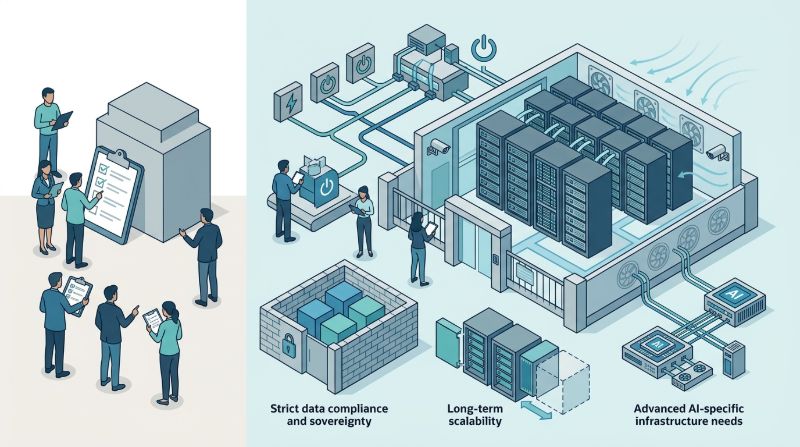
Power converts to heat, so cooling must be modeled with the same workload assumptions. Air cooling may be adequate for some configurations, while higher-density designs may require rear-door heat exchangers or liquid-assisted approaches. The decision should consider maintenance, water or facility constraints, and the service level expected for the cluster.
Network topology also influences the facility plan. Distributed training needs low-latency paths between nodes, and storage traffic can create a second sustained load. OneSource Cloud’s AI networking services and AI storage architecture are relevant when the performance plan must account for data movement as well as compute.
How to Build a Deployment Power Model
Start with workload classes
Separate training, batch inference, interactive inference, data preparation, and development workspaces. Estimate the expected concurrency and duty cycle for each class. A single blended average can hide the peak conditions that determine electrical and thermal requirements.
Measure before scaling
Use a representative node or pilot cluster to capture sustained draw, temperature, utilization, and network behavior. Compare measured values with design assumptions and document the uncertainty range. This evidence is more useful than relying on a single vendor power figure.
Plan monitoring and escalation
Power and thermal telemetry should feed the same operational process as GPU health and job monitoring. Alerts should identify whether a change comes from workload demand, a cooling issue, a circuit fault, or a hardware anomaly. Managed operations can help maintain this monitoring after deployment.
Where Managed Infrastructure Helps
Power planning does not end when a cluster is commissioned. Utilization changes, new GPU generations are introduced, and workloads move between training and inference. OneSource Cloud’s managed AI infrastructure service can support capacity planning, monitoring, and lifecycle reviews so facilities assumptions remain aligned with actual AI demand.
FAQ
How much power does an AI GPU cluster use?
Power use depends on the GPU model, server configuration, network and storage components, utilization, and cooling overhead. A useful estimate separates nameplate capacity, measured sustained draw, peak conditions, and facility overhead rather than quoting one generic number.
Why is rack power density important for AI infrastructure?
Rack power density determines whether circuits, UPS systems, busways, airflow, and cooling equipment can support the cluster safely. High density can create a local thermal bottleneck even when the building has sufficient total power.
What should a colocation provider verify for a GPU cluster?
Verify available power per rack, redundancy, cooling method, network cross-connects, maintenance procedures, monitoring access, and expansion lead time. Confirm that the stated capacity applies to sustained AI workloads rather than short bursts.
Can power monitoring improve GPU infrastructure efficiency?
Yes. Power telemetry can reveal underutilized nodes, thermal throttling, and workload patterns that increase cost without improving throughput. Combined with utilization and job metrics, it supports better scheduling and capacity decisions.
Summary
GPU cluster deployment can reshape electrical, cooling, network, and maintenance requirements. Model those impacts with real workload classes, measured pilot data, redundancy targets, and growth assumptions. Treat power as a core AI infrastructure design input, not a late facilities check.
Next step: Discuss a private AI infrastructure capacity review with OneSource Cloud.
Related Articles
Recommended Reading
-
How Paged Attention Manages Inference KV Cache
-
Google Cloud GPU Pricing: What Enterprise AI Teams Should Evaluate Before Provisioning
-
Paperspace Pricing 2026: GPU Cost Breakdown
-
AI Infrastructure Costs: Controlling Enterprise GPU Spending
-
CoreWeave Enterprise GPU Cloud: Evaluation for AI Teams
-
CoreWeave vs Lambda Labs vs OneSource Cloud: GPU Provider Decision Guide
-
AWS GPU Pricing: Instance Types, Cost Structure & Alternatives Guide
-
U.S. Data Residency in the Cloud: Requirements, Regulations & Compliance Guide
latest articles
-
Private GPU Cloud Failover Without Breaking Data Isolation
-
GPU Telemetry Release Correlation to Diagnose Model Regress
-
Managed AI Infrastructure vs Self-Managed Clusters: Real TCO
-
Multi-Tenant GPU Governance for Healthcare and Clinical AI
-
Data Center Power Planning for AI Workloads and High Density
-
AI Network Latency Component Map: Where Microseconds Vanish
-
AI Model Runtime Portability: How to Prevent Cloud Lock-In
-
H100 Dedicated GPU Cloud Planning: Sizing, Power, and Fabric
-
Industrial AI GPU Infrastructure for Factory Vision Systems
-
Single-Tenant GPU Cloud vs Multi-Tenant GPU Cloud Security